




scopusflow is a reproducible, quota-aware workflow layer over the Elsevier Scopus Search API. It turns one-off bibliographic queries into inspectable plans and retrieves records with pagination, rate-limit handling, retry with back-off and optional resumable caching. It normalises the records to a stable tidy schema, tracks changes in DOI sets over time, sizes sets of concepts and their intersections and compares publication trends across topics.
Its Python twin, the package of the same name, follows the same design on top of pybliometrics, so a search written in one language reads much the same in the other.
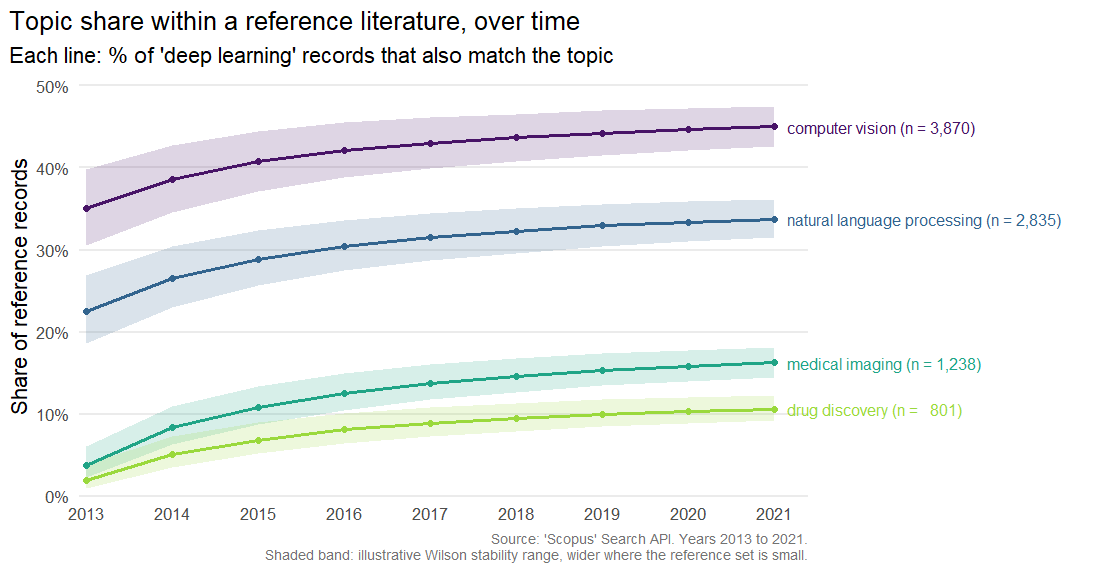
The figure is drawn by plot_scopus_comparison() from a
table of illustrative counts. The Comparing
topics over time article builds the same table and explains every
column.
Scopus is a trademark of Elsevier. scopusflow is an independent client and is not affiliated with or endorsed by Elsevier. You will need your own Elsevier API key and should use it under Elsevier’s API terms.
The released version is on CRAN.
install.packages("scopusflow")The development version, which may be ahead of CRAN, installs from GitHub. NEWS lists what each release added.
# install.packages("pak")
pak::pak("pablobernabeu/scopusflow")scopusflow never stores your key. It is read, in order, from the
api_key argument, the scopusflow.api_key
option or the SCOPUS_API_KEY environment variable. Store it
in ~/.Renviron.
SCOPUS_API_KEY=your-key-here
# Optional, for off-campus access to subscriber content:
SCOPUS_INST_TOKEN=your-institutional-tokenlibrary(scopusflow)
scopus_has_key()
#> [1] TRUEWith a key configured, a search runs as a plan: compose the query, size it, execute it with caching, then export or analyse the result. These calls contact the API and consume quota, so they are not run here.
# Compose a field-tagged query, then a reproducible plan partitioned by
# year to stay under the API's start < 5000 ceiling.
q <- scopus_query("perovskite", "solar cell", .field = "TITLE-ABS-KEY")
plan <- scopus_plan(q, years = 2012:2022, partition = "year")

# Size the search before spending quota, then execute, caching each year
# in a directory of the plan's own so an interrupted run can resume.
scopus_count(q, years = 2012:2022)
records <- scopus_fetch_plan(
  plan,
  cache_dir = file.path(scopus_cache_dir(), "perovskite-solar-cell"),
  resume = TRUE
)

# Save a clean DOI list, or export the records for a reference manager
# (Zotero, EndNote, Mendeley) or a LaTeX bibliography.
scopus_extract_dois(records, file = file.path(tempdir(), "dois.csv"))
as_bibtex(records, file = file.path(tempdir(), "records.bib"))

# Write the search up for the methods section, to the PRISMA-S standard,
# from what the plan and the harvest already record.
scopus_search_report(records, file = file.path(tempdir(), "search-record.md"))
The Get started vignette walks through this workflow offline, on records bundled with the package. The articles each cover one part in depth: designing queries, search plans, quota and the PRISMA-S search record, building a reference set, analysing and visualising a literature (trends, top sources and authors, concept intersections, abstracts and cursor-paged harvests), author keywords and references, comparing topics over time (the chart above) and tracking how a literature changes between retrievals.
run_app() opens a local Shiny app that lets you run the
whole workflow without writing code. Because it shows every choice as a
runnable R script, the app is also a way into the package. It runs on
your own machine, so your API key never leaves it. A demo mode lets you
try the workflow with no key, on the harvest of real articles bundled
with the package.
run_app()The retrieval runs in a background process with a live progress terminal, and records appear as a table and as plots with one-click export. It needs the suggested packages shiny, bslib and callr. The Using the code-free app article walks through every panel.
The Scopus API enforces a weekly quota and a short-term rate limit,
and ordinary offset paging returns at most the first 5000 records of any
query. scopusflow works within these limits. An offset-paged query is
capped at 5000 records with a warning that suggests cursor paging or
partitioning by year. Use scopus_fetch(cursor = TRUE) to go
beyond that limit. To use as few requests and as little quota as
possible, scopusflow asks for the largest page each view allows, 200
records for STANDARD and 25 for COMPLETE. This
is the same approach rscopus takes. The quota and
rate-limit headers are parsed by scopus_quota().
Throttling (HTTP 429), the server errors 500, 502, 503 and 504,
timeouts and reset connections are retried with back-off that honours
Retry-After. A spent weekly quota, which Elsevier also
answers with HTTP 429, is not retried. A failure is signalled as a typed
condition, and every scopus_error_* condition inherits from
scopus_error. The Get started vignette shows the
tryCatch() pattern for responding to these conditions in
code.
Several R packages serve related purposes, and scopusflow is meant to work alongside them.
| Package | Focus | Relationship to scopusflow |
|---|---|---|
rscopus |
Low-level Scopus API wrapper | scopusflow works at a higher workflow layer (plans, quotas, caching,
diffs) and calls the API directly through httr2 |
openalexR,
pubmedR,
dimensionsR,
rcrossref |
Other bibliographic databases | Complementary, covering different sources |
bibliometrix |
Science mapping and analysis | Downstream, receiving records from
as_bibliometrix() |
Under ordinary offset paging, the Scopus Search API returns at most
the first 5000 records of a query. A larger search is best partitioned
by year with scopus_plan() or harvested in one pass with
scopus_fetch(cursor = TRUE), which trades relevance order
for completeness.
as_bibliometrix() maps the core descriptive fields the
Search API returns. Structured reference lists are available through
scopus_abstract(view = "FULL", include = "references") and
scopus_corpus(), but an analysis that needs full
affiliations, or bibliometrix’s own cited-reference (CR) field, will
still call for a complete Scopus export. What you can retrieve also
depends on your Elsevier entitlement, and some fields are available only
in the COMPLETE view and to subscribers.
If scopusflow contributes to published work, please cite it. R prints the reference and its BibTeX entry.
citation("scopusflow")The DOI that CRAN assigned to the package is https://doi.org/10.32614/CRAN.package.scopusflow, and it covers every version.
The About
page carries the same citation with a BibTeX entry, and a short note
on the developer. The repository also includes a
CITATION.cff, which GitHub’s ‘Cite this repository’ button
reads.
MIT. Scopus is a trademark of Elsevier. scopusflow is an independent client and is not affiliated with or endorsed by Elsevier.
Issues and pull requests are welcome. The contributing guide describes the development setup and the conventions the package follows, and everyone taking part is asked to honour the Code of Conduct.
Pull requests and pushes to the main branch are checked on Windows, macOS and Linux across several versions of R. To find failures caused by changes in the package’s dependencies early, a scheduled job also re-checks the package every other day against their current and development versions. The contributing guide describes how the job reports, and tries to resolve, any problem it finds.